

Plan | Play | Reflect – A Programming Guide for OOSH Educators
💬 “I want to do programming right… I just don’t know where to start.”
If that sounds like you or your team, this toolkit is for you.
Whether you are a leader supporting your team, or a new educator just trying to understand how it all works — this toolkit will help.
This toolkit also includes a clear, easy-to-follow How to Use Guide, written with everyday educators in mind. Whether you are brand new to programming or supporting someone who is, this guide walks you through each resource step-by-step and shows how to use them in real service life — no jargon, no pressure, just simple, supportive guidance.
We have designed this resource to make the programming process feel simple, achievable, and supportive — especially for educators who are new to OOSH, casually employed, or still building their confidence.
This toolkit breaks programming down into 5 easy steps, explains what to do in plain language, and includes visual tools that take the pressure off. It is aligned with My Time, Our Place V2.0 and the National Quality Standard, and it is built with real OOSH services and real educators in mind.
Why This Toolkit Works
- ✅ Easy to understand — even if you have never done programming before
- ✅ Perfect for casual, new, and untrained educators
- ✅ Takes the fear out of documentation and planning
- ✅ Encourages team reflection and shared understanding
- ✅ Uses simple, everyday questions instead of complex language
- ✅ Helps you show evidence for MTOP and NQS without the stress
How to Use It
Follow the “How to” Guide that is designed to walk you through each part of the toolkit step by step. It explains what each resource is, how to use it in your day-to-day practice, and where it fits in the programming cycle. Whether you are new to programming or supporting others who are, this guide breaks it all down into simple, practical actions with real examples, prompts, and educator tips. Keep it nearby as a reference, use it during team discussions, or build it into your induction and training process — it is here to support you at every step.
Print the posters for your walls, display the quick-reference tools in your programming area, and use the Educator Guide to build confidence at your own pace.
Start small. Start simple. Let the toolkit support you.
“Programming doesn’t have to be complicated. When we follow children’s lead and reflect as a team, meaningful learning happens naturally.”
OOSH Planning Cycle Toolkit - Programming Guide for OOSH Educators
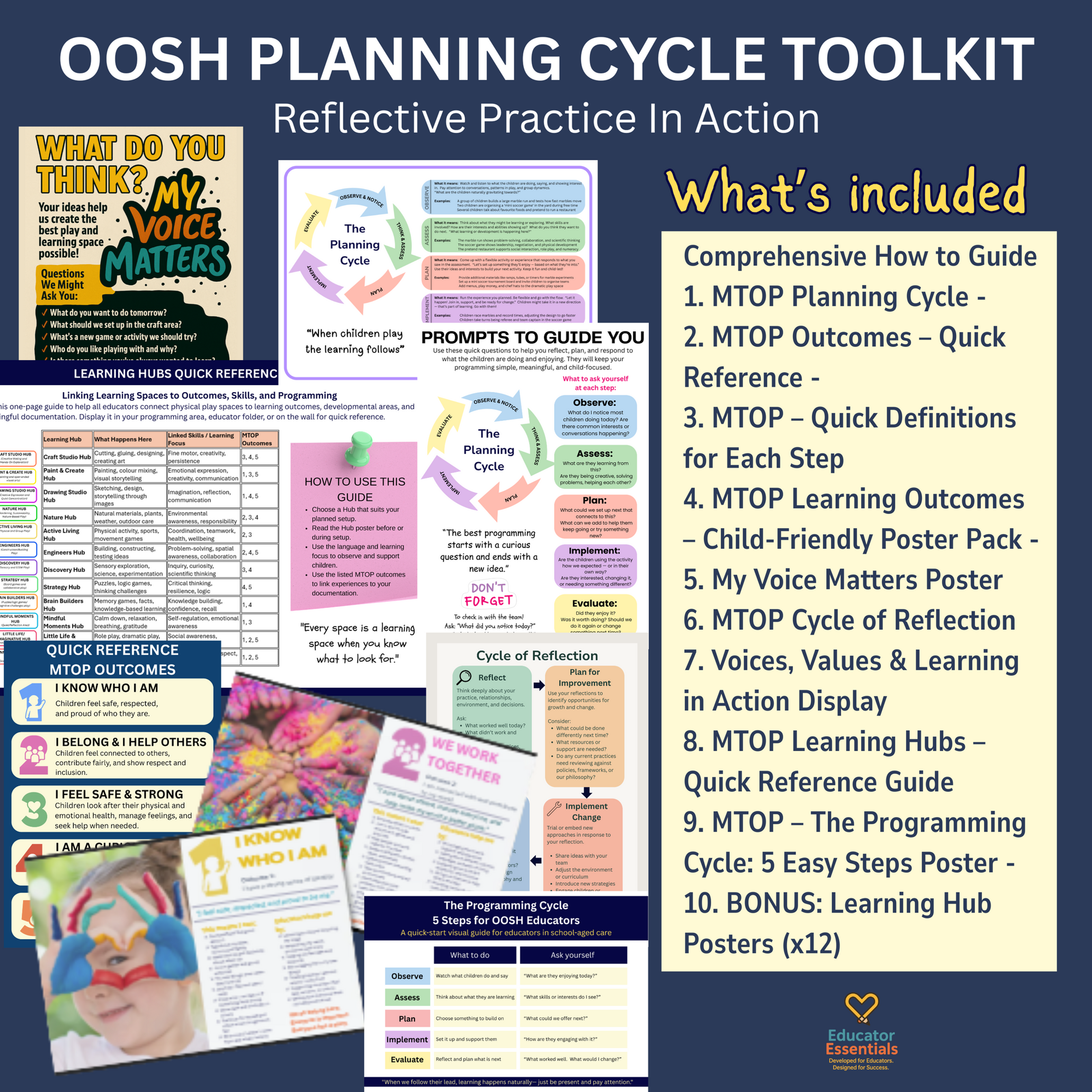
What’s Included
Everything in this toolkit is designed to make planning easier:
How to use our OOSH Planning Cycle Toolkit – Reflective Practice in Action
A supportive and easy-to-follow guide that walks educators through each resource, explains how to use them in real OOSH practice, and supports teams of all experience levels to feel confident with programming.
Core Toolkit Resources:
1. MTOP Planning Cycle - A clear visual overview of the five-step programming process: Observe, Assess, Plan, Implement, Evaluate — with real-world examples and educator prompts.
2. MTOP Outcomes – Quick Reference - An at-a-glance guide to the five MTOP V2.0 Outcomes using child-friendly phrasing and visual icons.
3. MTOP – Quick Definitions for Each Step - A simplified breakdown of the programming cycle steps with clear actions and reflection questions to help educators know what to do next.
4. MTOP Learning Outcomes – Child-Friendly Poster Pack - Five A4 posters that help children understand each learning outcome in their own words. Includes educator support strategies and inclusive language.
5. My Voice Matters Poster - A child-friendly prompt poster to support children’s agency, voice, and decision-making within your program. Great for suggestion walls or reflection corners.
6. MTOP Cycle of Reflection - A visual framework to help educators and teams reflect on what is working, what needs to change, and how to evaluate the impact of their programming.
7. Voices, Values & Learning in Action Display - A professional display template connecting your program to your philosophy, children’s voices, and family engagement. Perfect for Assessment & Rating.
8. MTOP Learning Hubs – Quick Reference Guide - An overview of how each learning space in your service supports learning outcomes and educator practice, plus guidance on using Hub posters during planning.
9. MTOP – The Programming Cycle: 5 Easy Steps Poster - A colourful A4 landscape poster outlining the full 5-step programming cycle with quick prompts, reflection questions, and educator-friendly reminders.
BONUS: Learning Hub Posters (x12)
This toolkit includes 12 beautifully designed Learning Hub posters that make your environment visible as a learning space. Each Hub includes:
- What learning happens in that area
- Which MTOP outcomes are supported
- Educator prompts and reflective questions
- Language to support intentional teaching
Included Hubs:
- Mindful Moments Hub
- Discovery Hub
- Craft Studio Hub
- Drawing Studio Hub
- Nature Hub
- Active Living Hub
- Engineers Hub
- Little Life & Imagination Hub
- Paint & Create Hub
- Strategy Hub
- Brain Builders Hub
- Connection Circle Hub
These Learning Hubs turn everyday spaces into purposeful programming zones — making learning visible for children, families, and educators alike. These are perfect for display, and great for helping all educators feel confident in knowing the “why” behind every area.
File Format:
- PDF Document (High Quality)
- Size: A4 Standard (can be resized in printer settings)
- Digital Download — no physical product will be shipped
Terms of Use:
- For individual educator, classroom, or single service use only
- Not for resale, redistribution, or commercial use
- Copyright © Educator Essentials 2025
- Contact Educator Essentials for licensing inquiries for multi-site or school-wide use


